 Hullspark

Fewer chores in your store, your wiki and your spreadsheets
Hullspark makes small apps that take over the admin work: stock and shipping for online stores, cleanup for wikis and issue trackers, and spreadsheet and screenshot tools for your PC. Each does one job.
- Your data stays put — inside the platform you already use, or on your PC.
- You see every change first — before it happens, not after.
What do you need to get done?
-
Confluence and Jira apps
Clean up labels, attachments and custom fields, and keep pages reviewed.
-
Wix store apps
Catch low stock, print pick lists, edit product SEO in bulk and show closing days.
-
Windows utilities
Annotate screenshots, compare and split spreadsheets, and shrink heavy workbooks.
-
Japanese public tenders
Search public tenders from many agencies in one place.
-
Minecraft mods
Small free Fabric mods, one feature each.
For Confluence and Jira Cloud
Clean up Confluence and Jira without leaving Atlassian. Four apps on the Atlassian Marketplace; nothing leaves your Atlassian site.
-
Label Sweep for Confluence
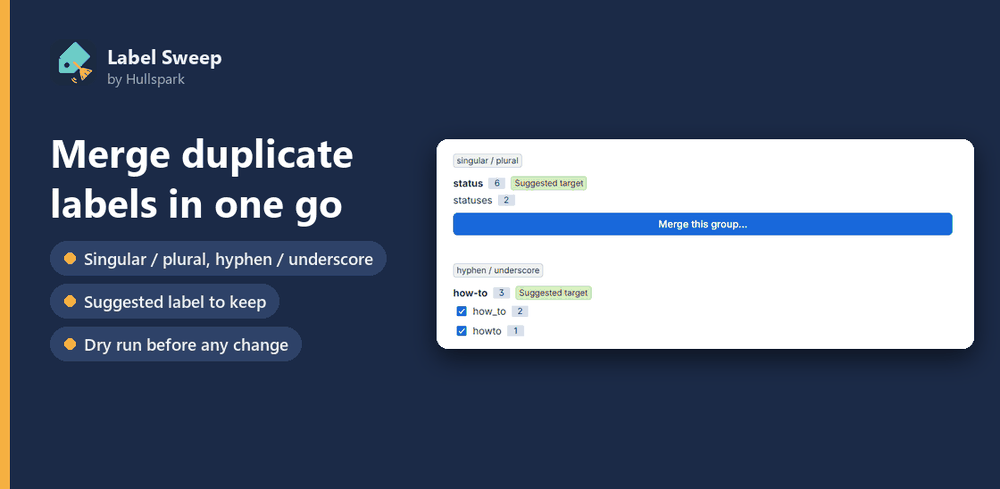
Confluence has no built-in way to rename, merge or bulk-delete labels. Label Sweep lists every label with its usage count and does all three across pages and blog posts — a dry run shows the affected pages first, and every job leaves a log.
Details, screenshots and FAQ 日本語のページ Available on Atlassian Marketplace — free for up to 10 users, 30-day trial for more -
Attachment Sweep for Confluence
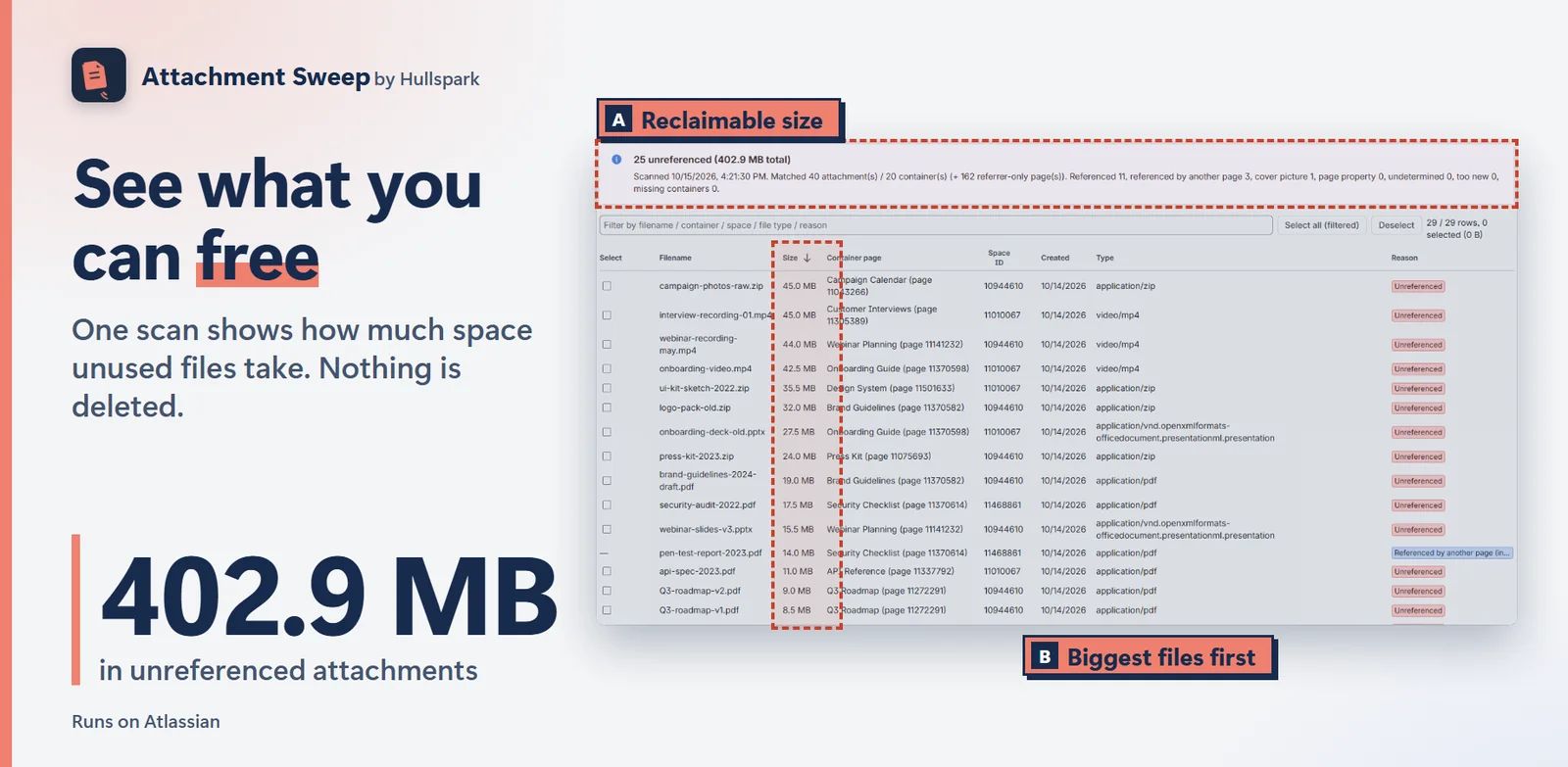
Confluence has no built-in way to find attachments that nothing references any more. Attachment Sweep lists them by space, size and date, and moves the ones you pick to the trash after a dry run — never purged, so an admin can restore them.
Details, screenshots and FAQ 日本語のページ Available on Atlassian Marketplace — free for up to 10 users, 30-day trial for more -
Page Review Reminders for Confluence
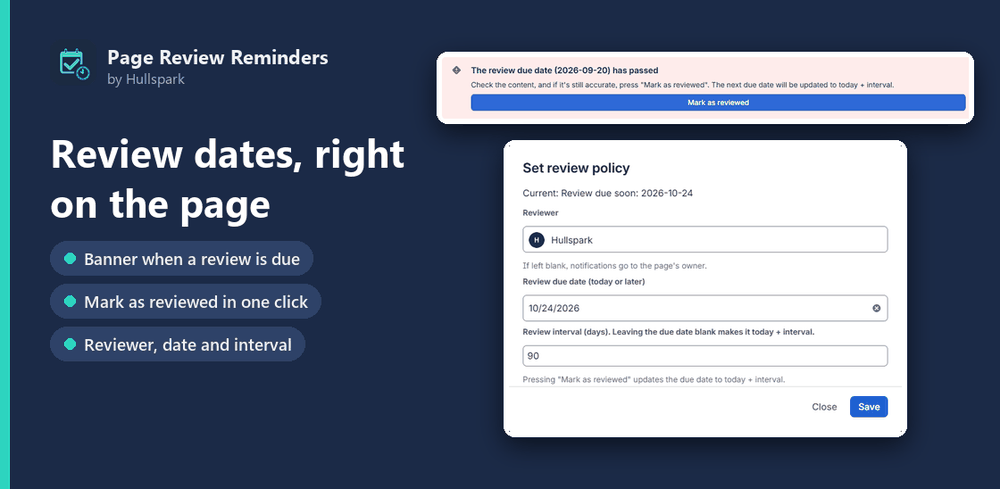
Confluence Cloud keeps review dates in Premium's Content Manager. Page Review Reminders brings a lighter version to every plan: set a reviewer and a due date on a page, and the reviewer is @mentioned in a comment when it comes due. Guide: finding stale pages in Confluence.
Details, screenshots and FAQ 日本語のページ Available on Atlassian Marketplace — free for up to 10 users, 30-day trial for more -
Field Sweep for Jira
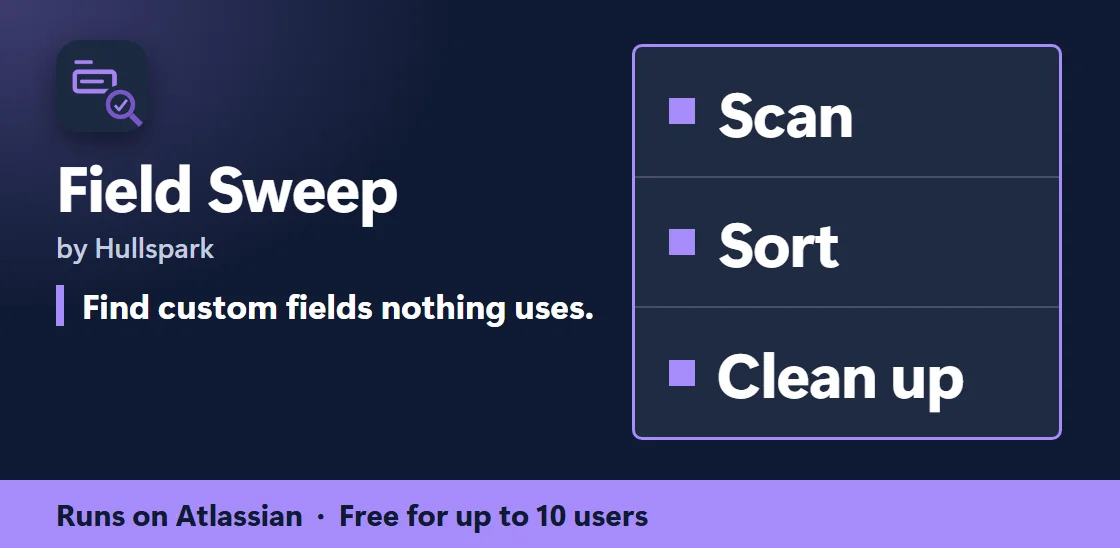
Which of your Jira custom fields are actually used? Field Sweep checks each one against saved filters, boards and dashboards, and shows what you "Can clean up" and what is "To review". Admin-only. A scan only reads; after a review you can move an unused field to Jira's trash and restore it. It never deletes a field for good. Guide: auditing Jira custom fields.
Details, screenshots and FAQ 日本語のページ Available on Atlassian Marketplace — free for up to 10 users, 30-day trial for more
For Wix stores
Save time on stock, packing, SEO and bookings. The last three apps are built for shops in Japan. Seventeen apps on the Wix App Market; most have a free plan.
-
Low Stock Alert
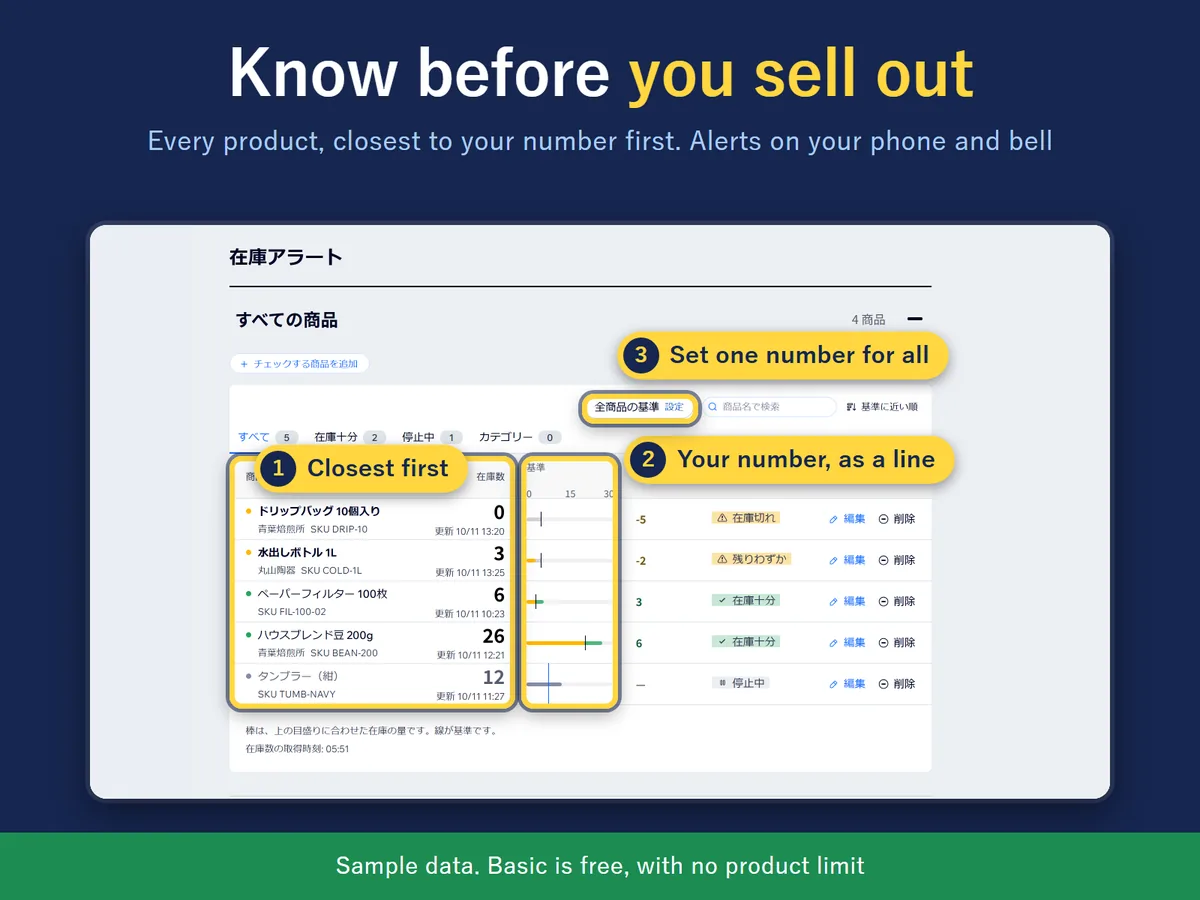
Want to see which products are running low before they run out? Set one number for every product (or your own number for a product or variant); when stock reaches it, an alert goes to the dashboard bell and the Wix app on your phone, with a morning summary and an order note by supplier. Free with no product limit. It reads products, categories and stock only — no customer or order data. Guide: low stock alerts in Wix Stores
Low Stock Alert: details, video and FAQ 在庫アラート: 特徴・よくある質問(日本語) 解説: Wix ストアの在庫切れと在庫通知(日本語) 解説: Wix ストアの発注リストの作り方(日本語) On the Wix App Market — free plan available -
Picking & Packing List
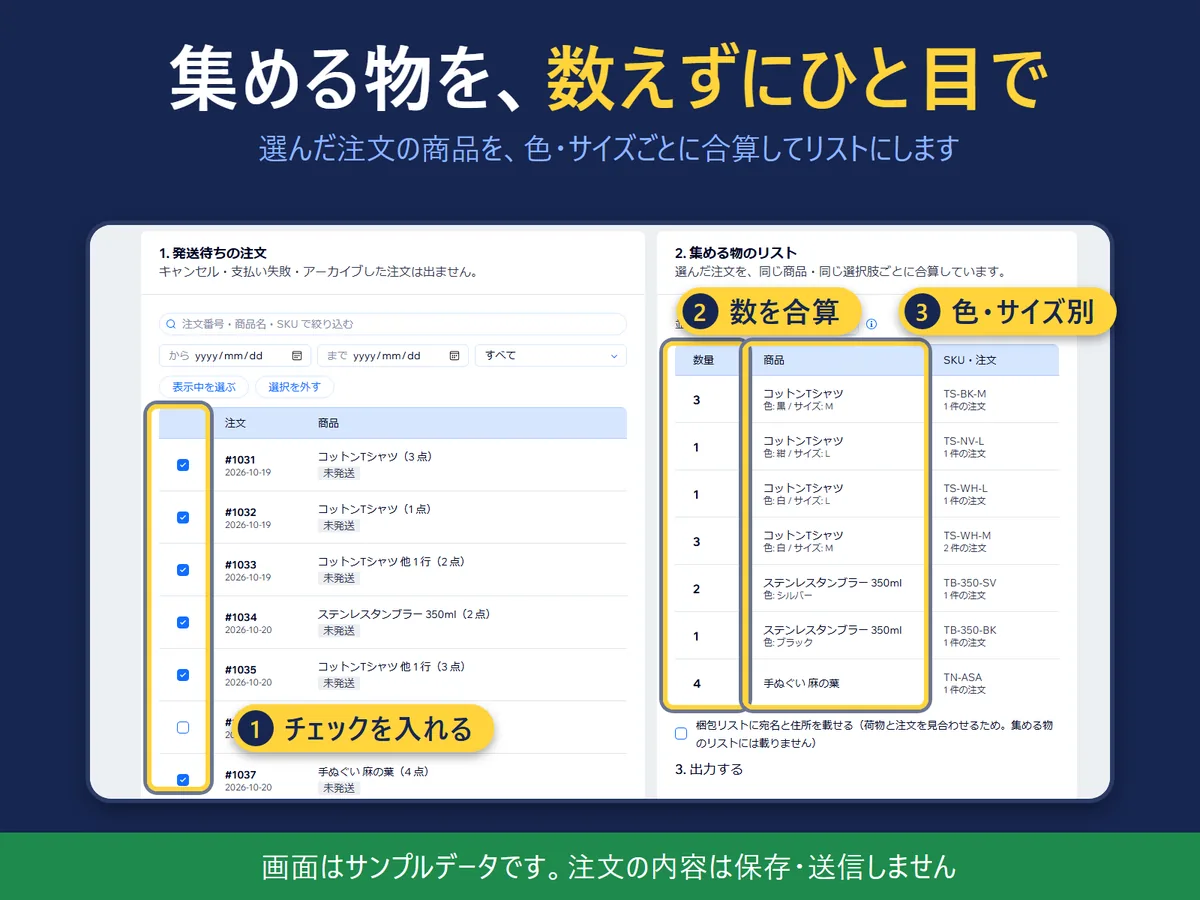
Packing a day of orders one by one means walking to the same shelf again and again. Adds up your open orders into one pick list and prints a packing list per order, as PDF or CSV. Screens in Japanese and English, with sample orders to try. Free up to 20 orders per list; the paid plan removes the limit.
Picking & Packing List: details and FAQ ピッキング・梱包リスト: 画面・特徴・よくある質問(日本語) On the Wix App Market — free plan available -
Product SEO Bulk Edit
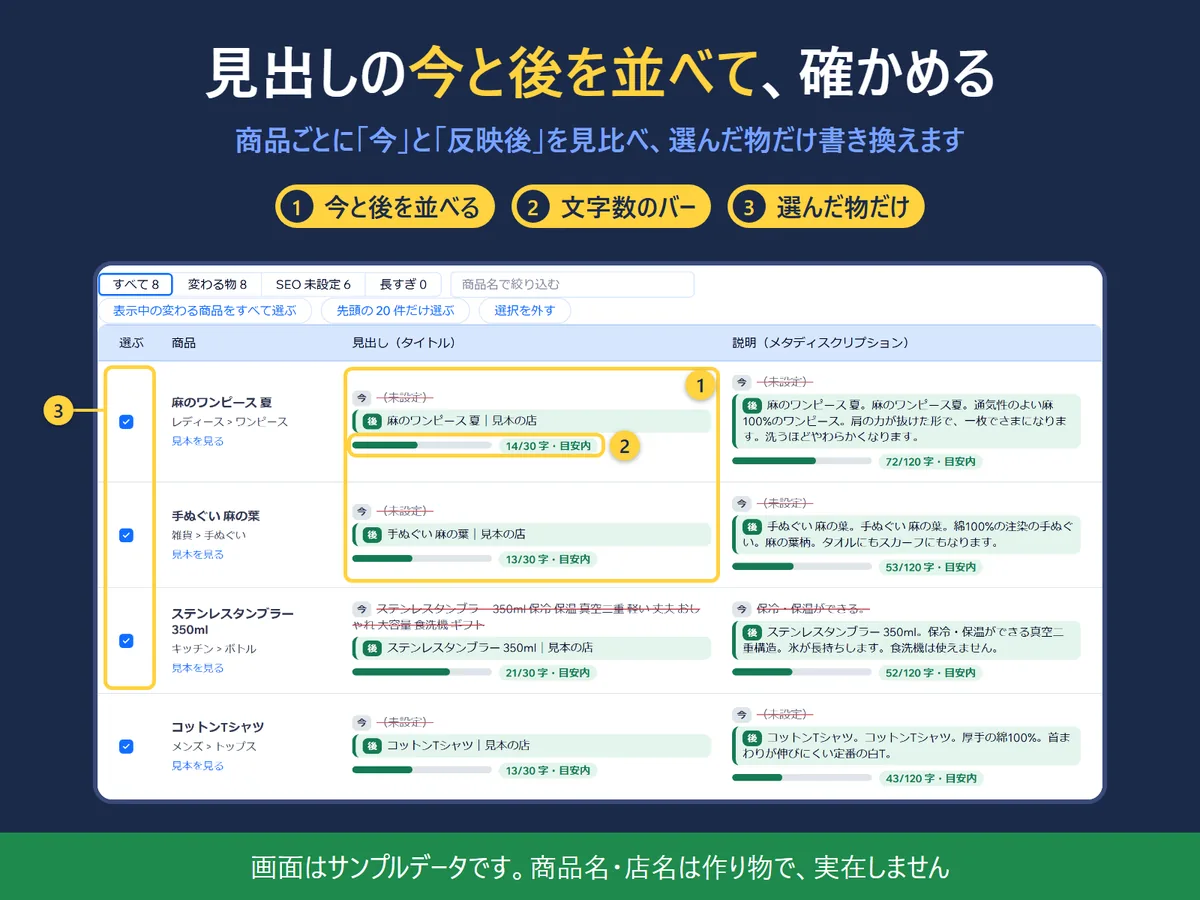
Rewriting product search titles and descriptions one by one is slow, and a bulk edit is hard to take back. Preview current vs. new text side by side, apply only the products you tick, and undo a run from its saved record. Screens in Japanese and English. Free up to 20 products per run; the paid plan removes the limit.
Product SEO Bulk Edit: details and FAQ 商品 SEO 一括編集: 画面・特徴・よくある質問(日本語) On the Wix App Market — free plan available -
Stocktake
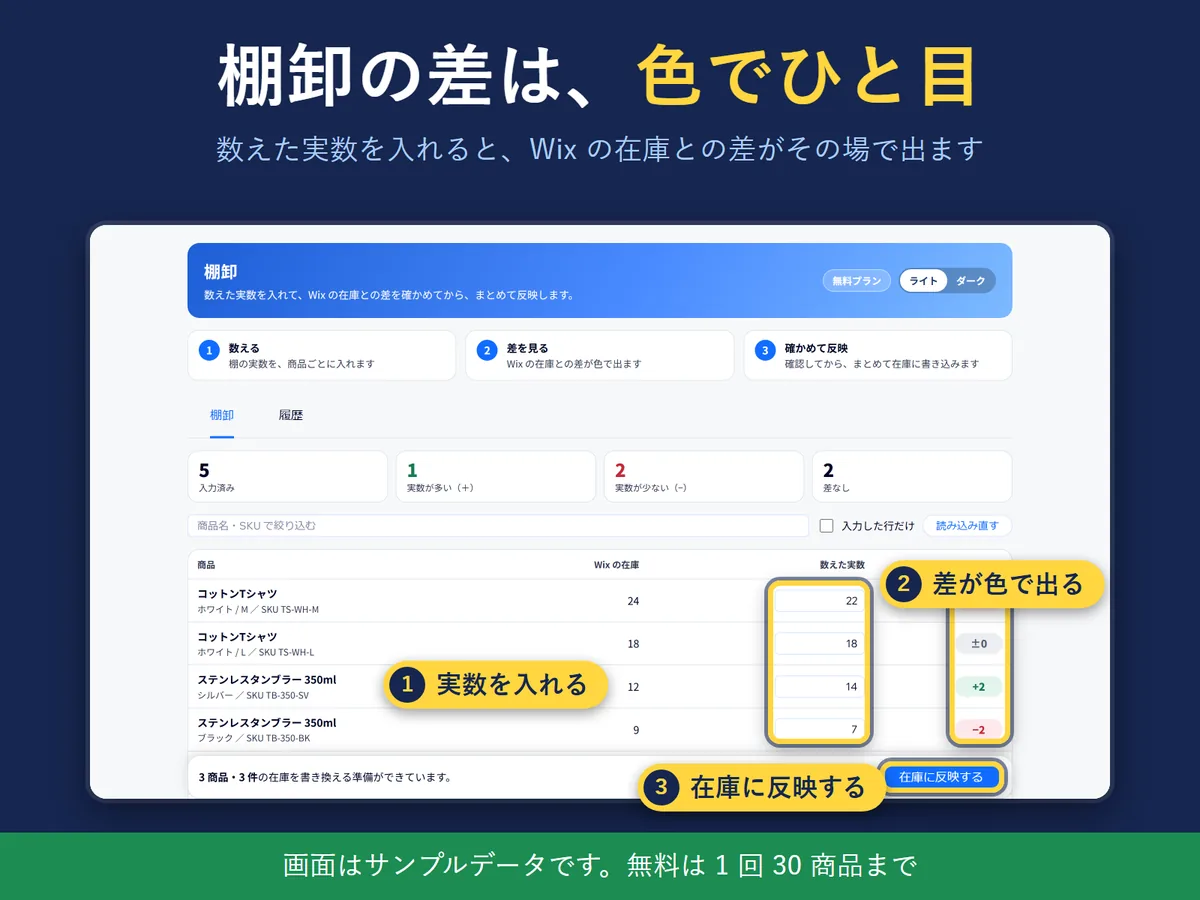
Updating stock product by product after a shelf count takes a long time. Type the counted quantities, check the gap against your Wix stock, then apply them in one go. Before and after numbers are kept in a history you can export as CSV. Screens in Japanese and English, with sample products to try. Guide: doing a stocktake in Wix Stores.
Stocktake: details and FAQ 棚卸: 画面・特徴・よくある質問(日本語) On the Wix App Market — free plan available -
Closure Days for Bookings
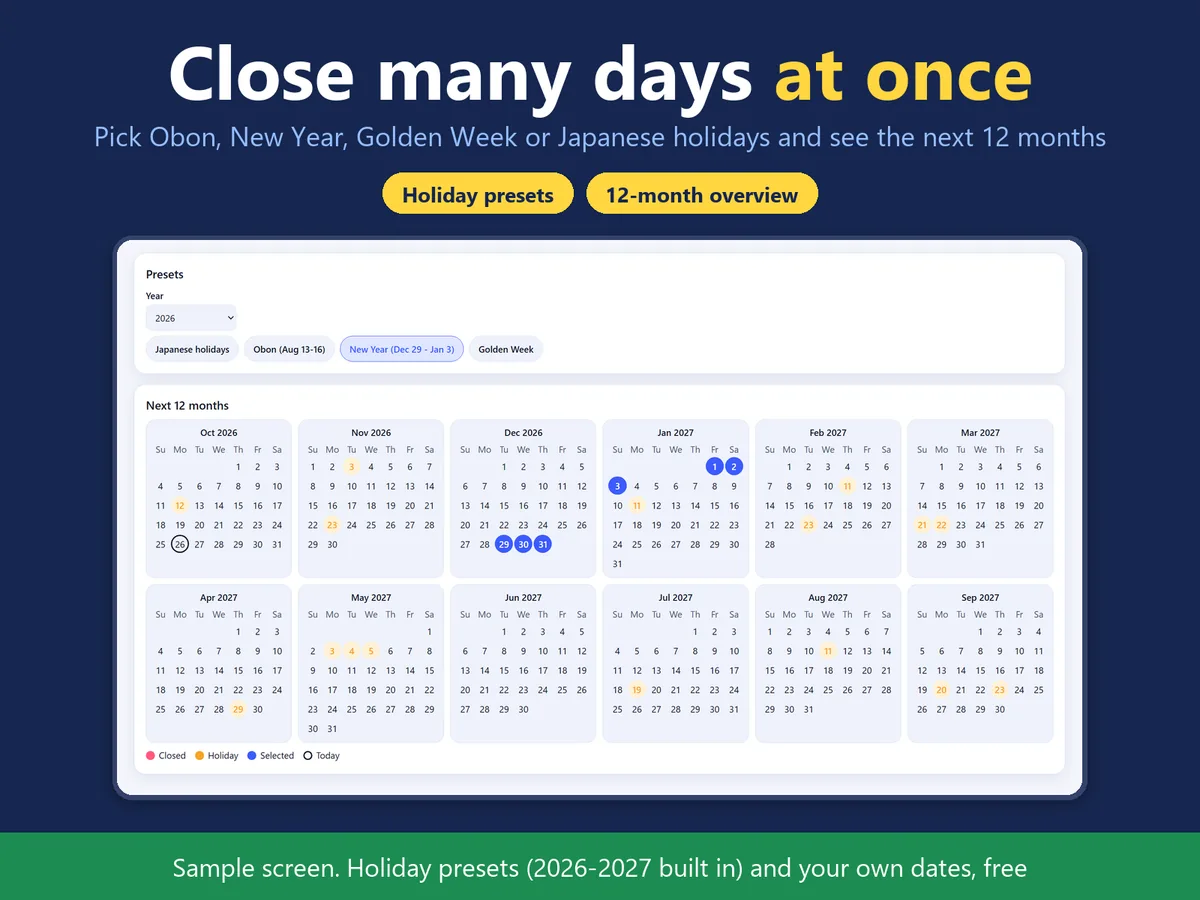
Wix Bookings has no “this day is closed” switch. Pick dates or a Japanese-holiday preset; the app first shows how many bookings already exist on those days, then adds a block to every staff member's and room's calendar. Undo removes only the closures the app made, and it never cancels bookings you already have. It covers services with a staff member or a room assigned.
Guide: stopping Wix Bookings on holidays Closure Days: details and FAQ 休業日まとめ設定: 画面・特徴・よくある質問(日本語) On the Wix App Market -
Booking List Print & CSV
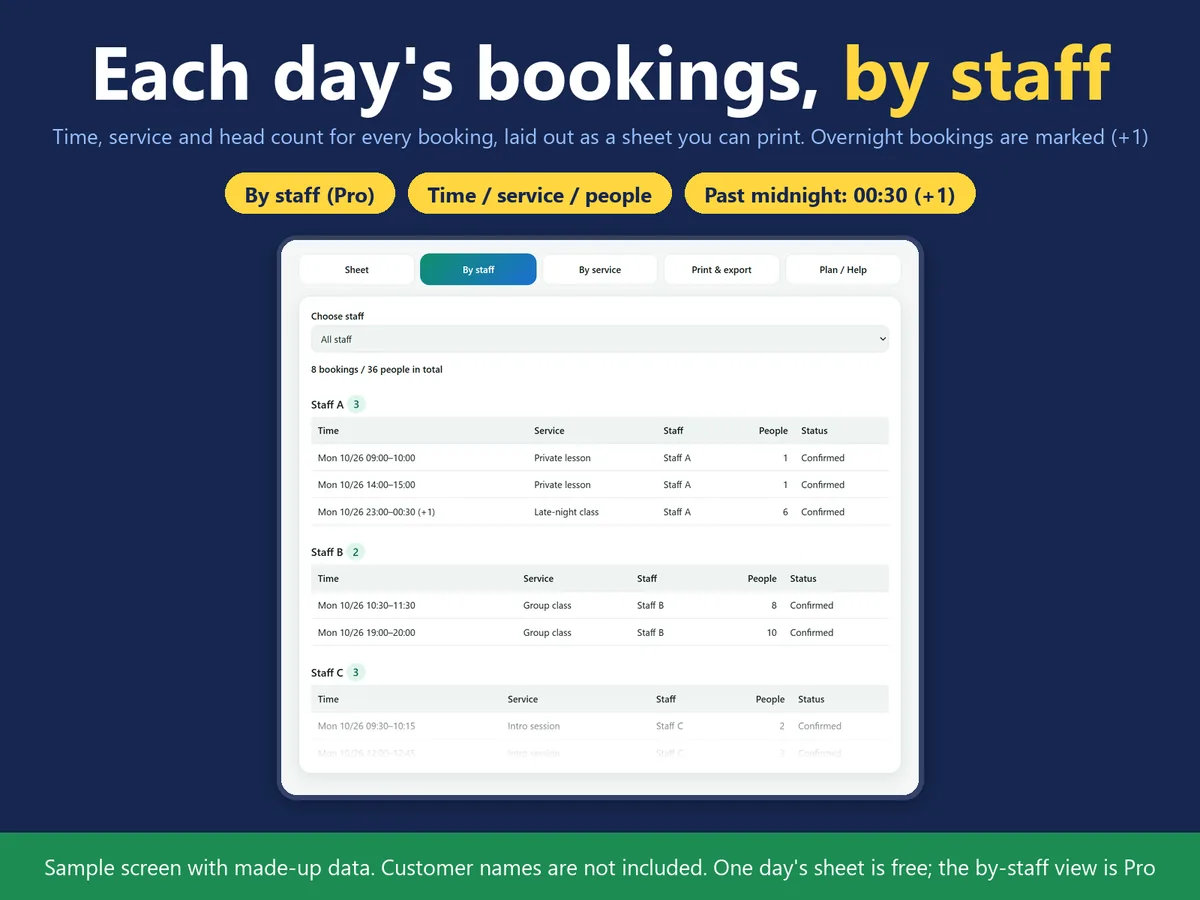
Printing a day's bookings means exporting a CSV and tidying it first. This app adds one page to your dashboard that lays out each booking's time, service, staff member and head count as a day or week table you can save as an A4 PDF or a CSV. It does not read customer names, phone numbers or email addresses. One day's sheet is free; the by-staff view is Pro.
Guide: printing the Wix Bookings list Booking List Print & CSV: details and FAQ 予約表の印刷と CSV: 画面・特徴・よくある質問(日本語) On the Wix App Market -
Monthly Booking Calendar
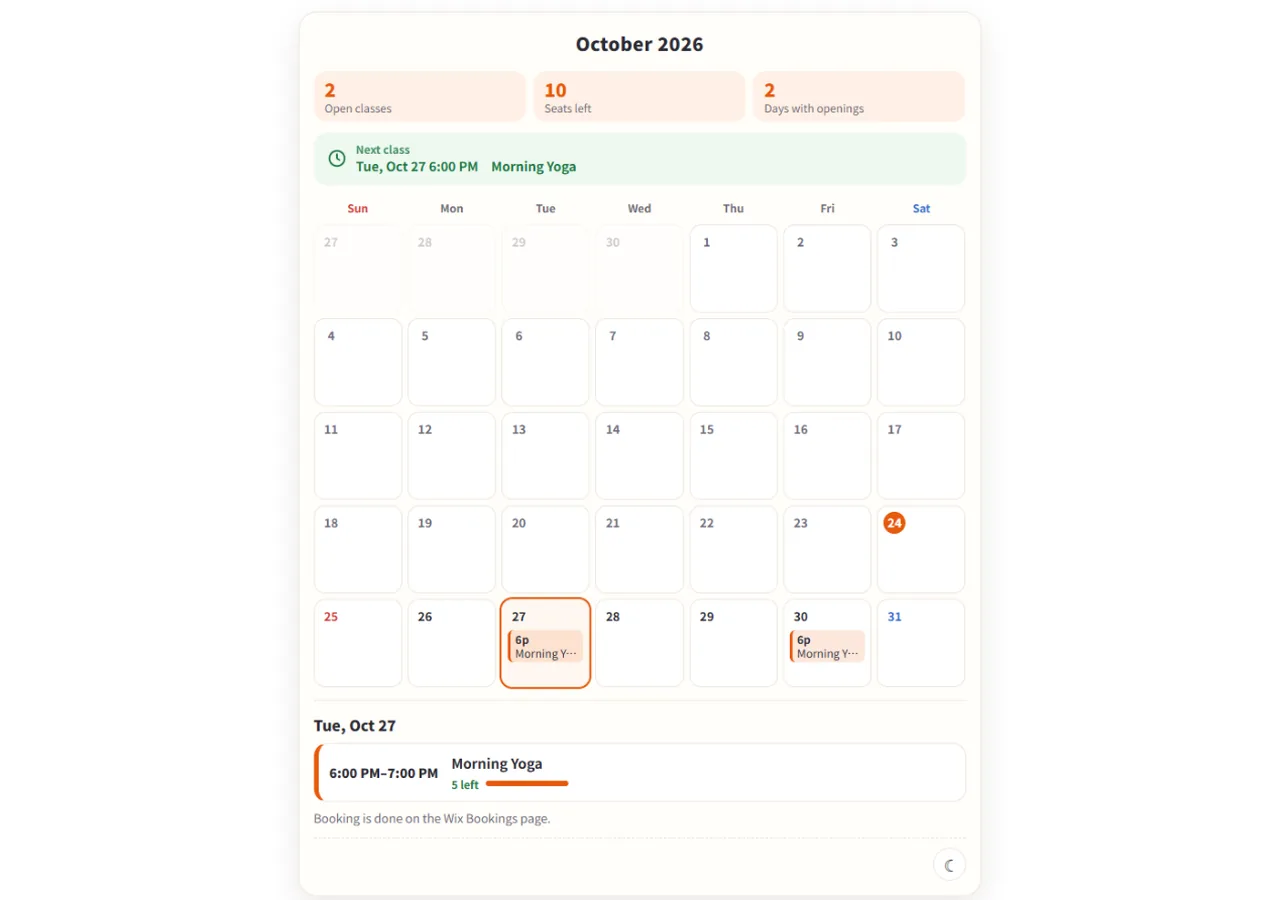
Wix Bookings shows class times by the week, not by the month. Shows your Wix Bookings classes on your site as a month grid. Tap a date to see that day's classes and the seats left, with a link to book. Classes only, not one-to-one bookings or courses.
Monthly Booking Calendar: details and FAQ 解説: Wix ブッキングのクラスを月のカレンダーで見せる(日本語) 月間予約カレンダー: 画面・特徴・よくある質問(日本語) On the Wix App Market — free plan available -
Table of Contents by Hullspark
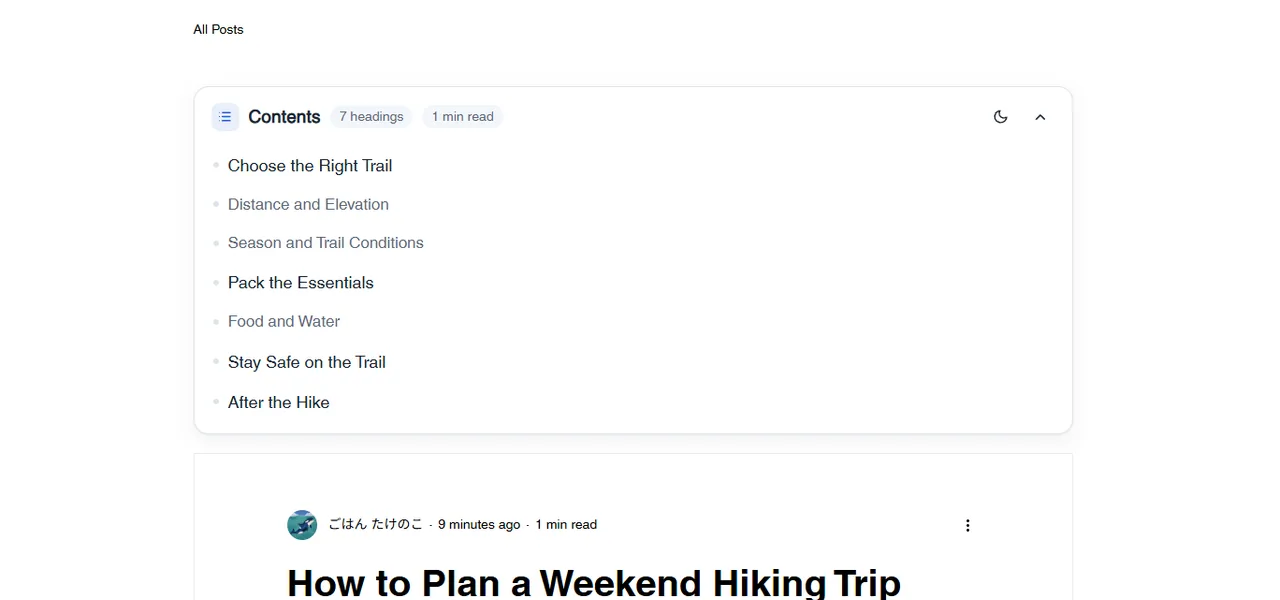
Wix Blog has no built-in table of contents. Builds a table of contents at the top of each blog post from its headings, including Japanese ones. Tap an entry to jump to that heading. Blog posts only.
Table of Contents: details and FAQ 解説: Wix ブログの記事に目次を付ける方法(日本語) ブログ目次: 画面・特徴・よくある質問(日本語) On the Wix App Market — free plan available -
Allergen Chart for Restaurants
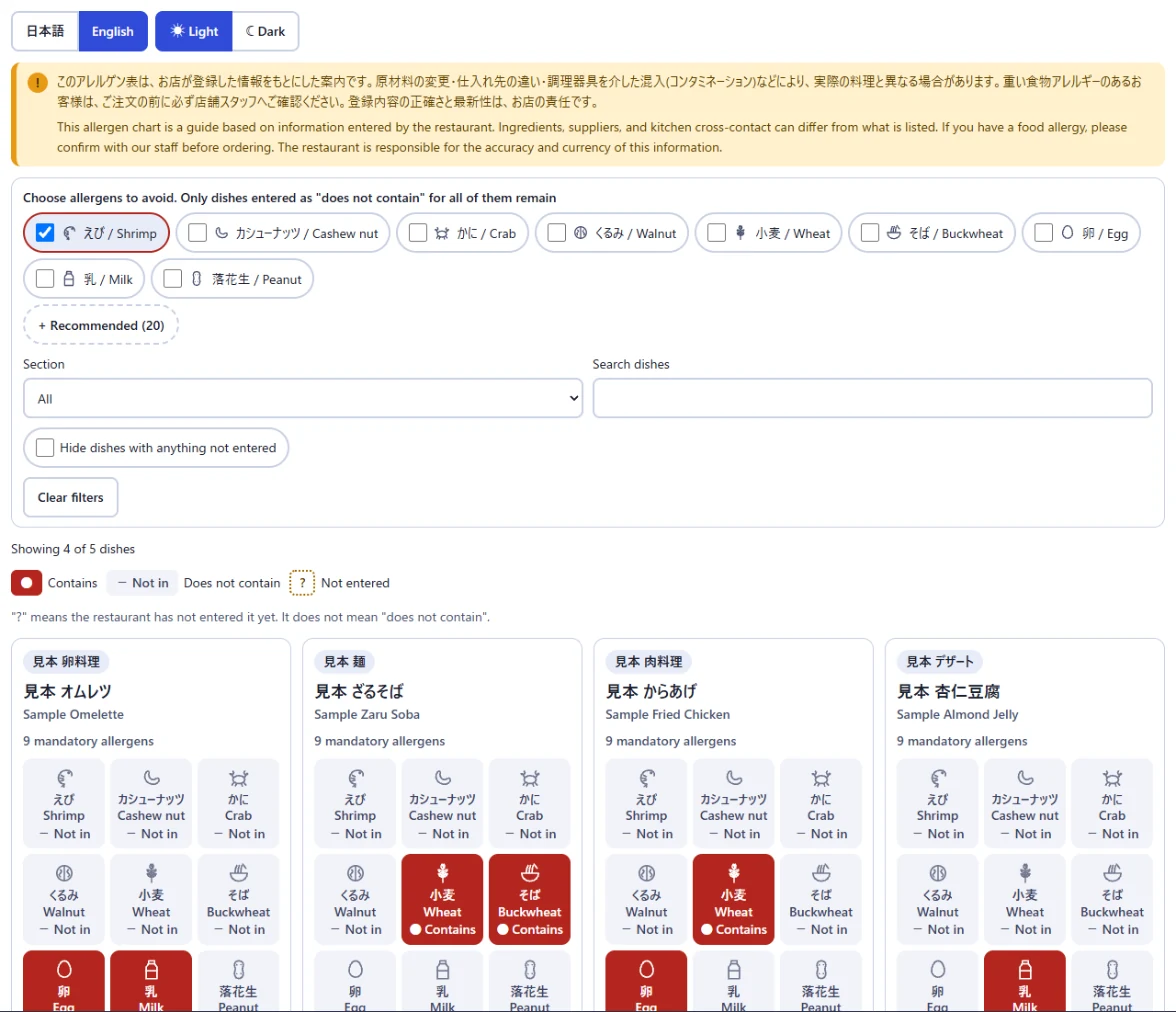
A Wix Restaurants menu has no allergen field. For each dish, mark each allergen as contains, does not contain or not entered; a widget shows one card per dish on your site, and visitors can filter out what they must avoid. It does not detect allergens, and you are responsible for what you enter.
Allergen Chart: details and FAQ アレルゲン一覧表: 特徴・よくある質問(日本語) Guide: allergen information on a Wix Restaurants menu 解説: Wix レストランメニューにアレルゲンを表示する方法(日本語) On the Wix App Market -
Sold-out to the End
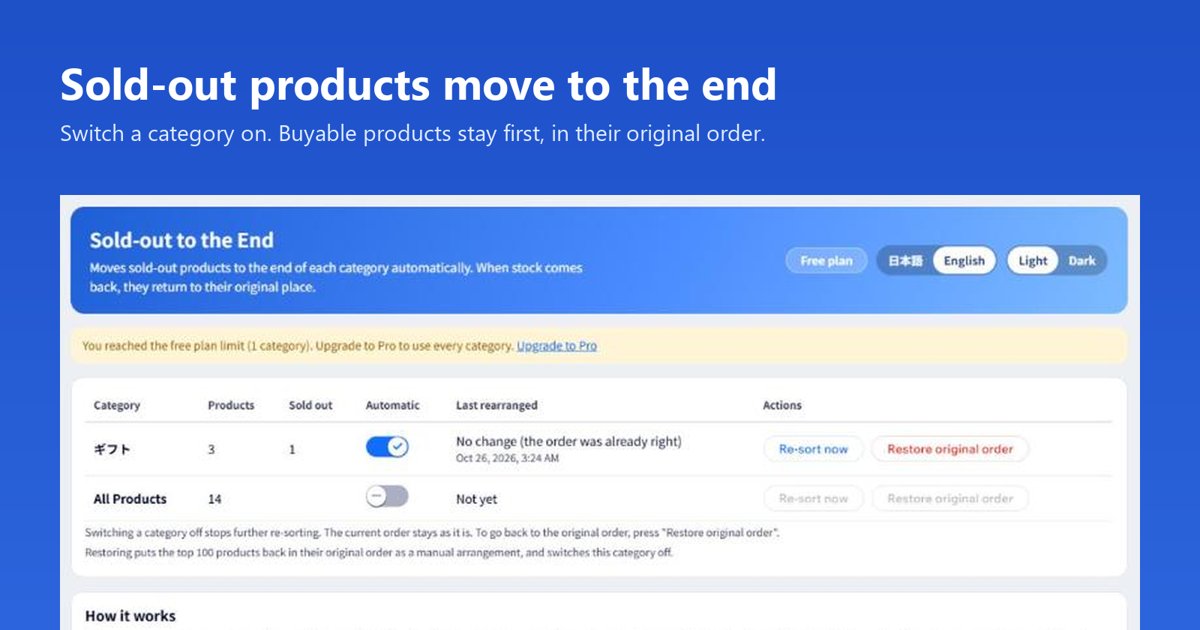
Sold-out products stay near the top of a category, and shoppers scroll past what they cannot buy. Switch a category on and products that can be bought stay first in their original order, while sold-out ones fall to the end; when stock returns, a product goes back to its place. Free for one category. It reads categories and inventory only. Works with the current Wix product catalog (Catalog V3).
Details, screenshots and FAQ 売り切れを一番後ろへ(日本語) On the Wix App Market — free plan available -
Bookings Bulk Editor
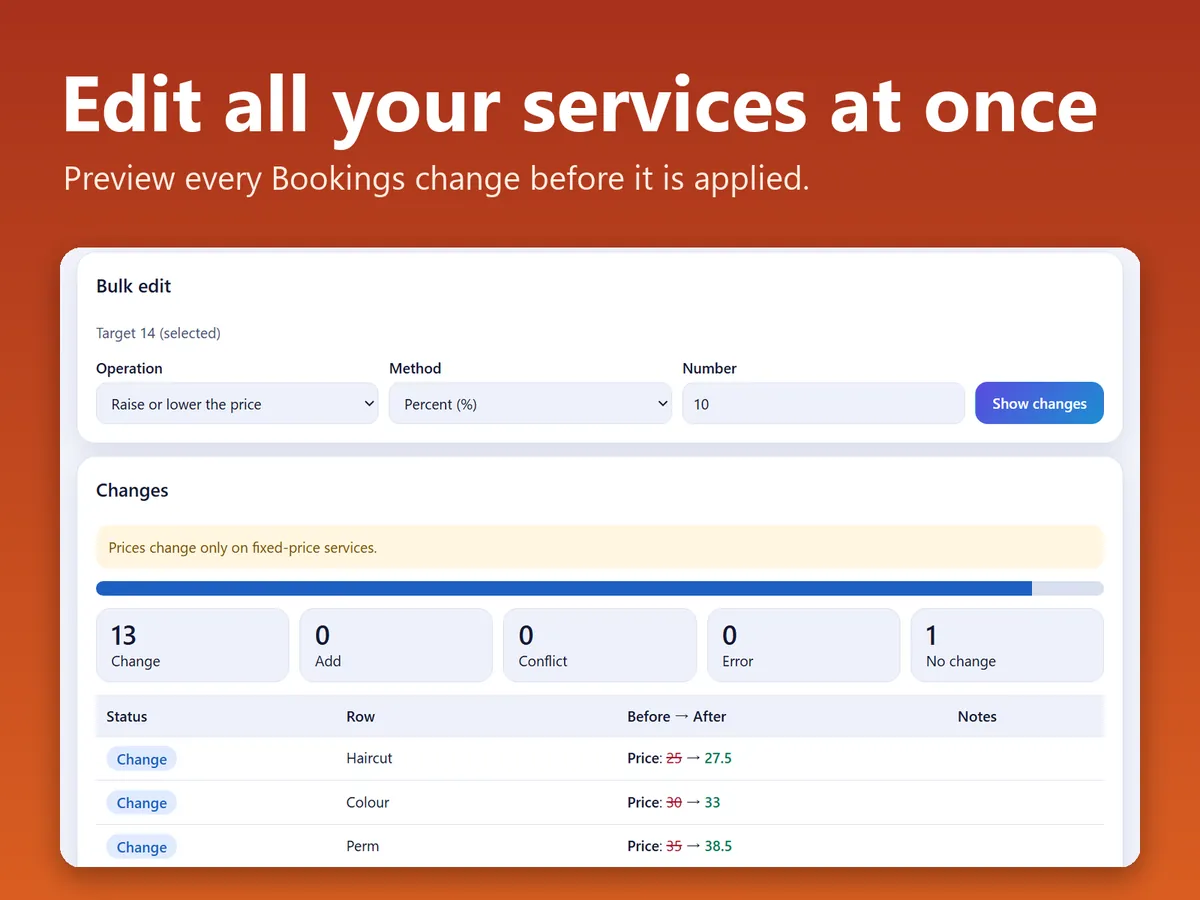
Changing prices or names on many Wix Bookings services means opening each one. Pick an operation for the selected services, read a before-and-after table, and apply only when you are ready. It also exports services to CSV, and only service settings are read, not bookings or customers.
Bookings Bulk Editor: details and FAQ 予約サービス一括編集: 画面・特徴・よくある質問(日本語) On the Wix App Market — free plan available -
Product Shelf Notes
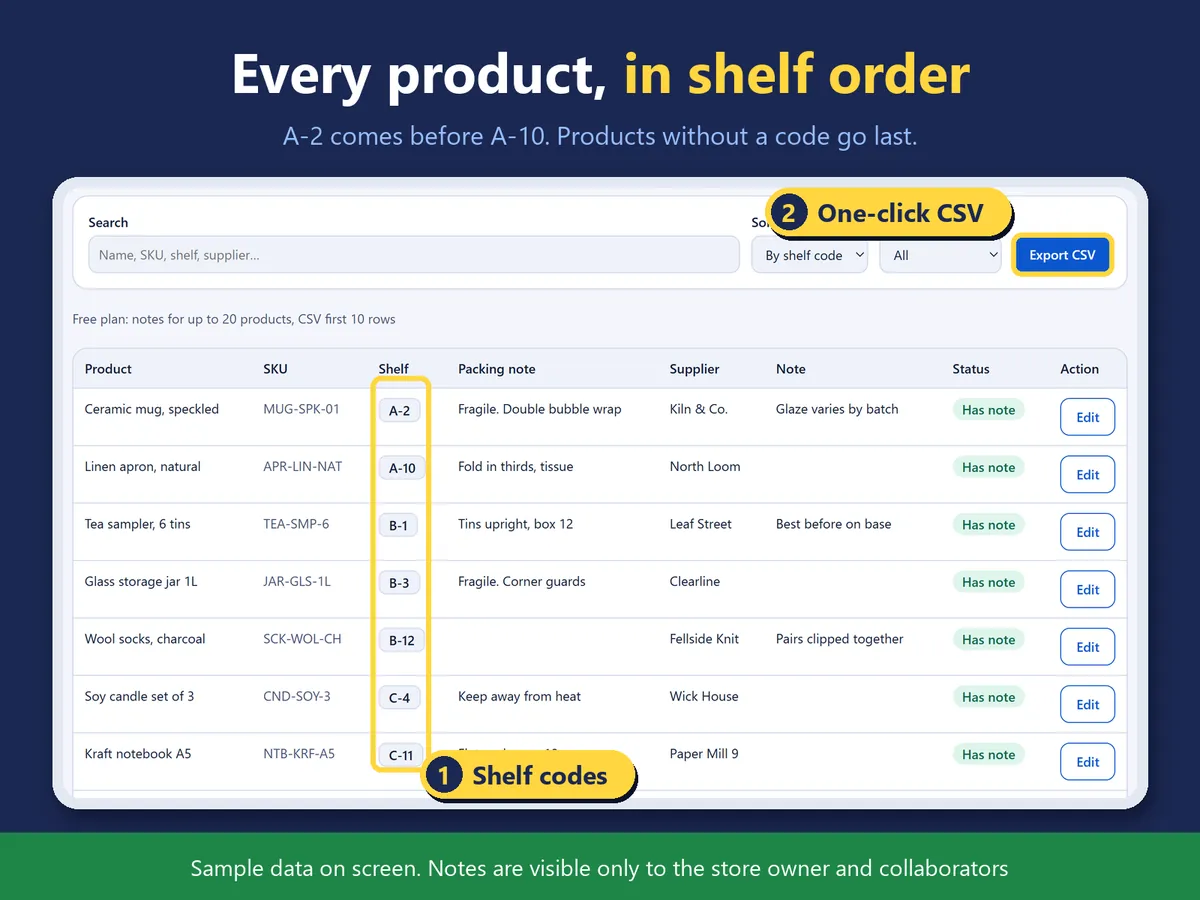
Where a product sits and how it is packed lives in a notebook, away from the store. Keep a shelf code, a packing note and a supplier next to each product, see one list sorted by shelf code, and export it as a CSV for picking or a stocktake. Only you and your collaborators see the notes.
Product Shelf Notes: details and FAQ 商品の棚番メモ: 画面・特徴・よくある質問(日本語) On the Wix App Market — free plan available -
Plan Switch Guard
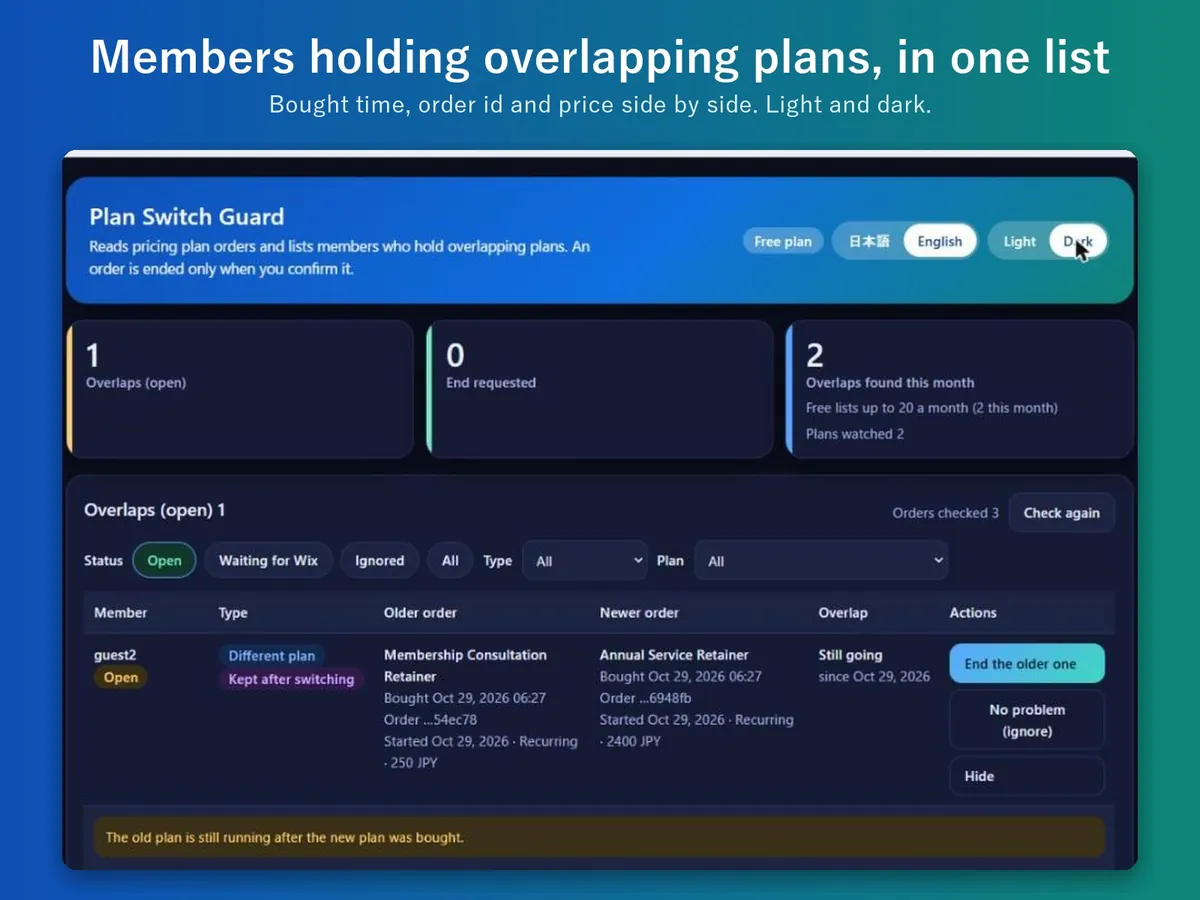
A member who switched plans can keep paying for the old one. Lists members whose Wix pricing plans overlap, shows both orders side by side, and ends one only after you confirm. It does not stop the purchase or contact members.
Plan Switch Guard: details and FAQ プラン切替ガード: 画面・特徴・よくある質問(日本語) On the Wix App Market — free plan available -
Info Section Bulk Manager
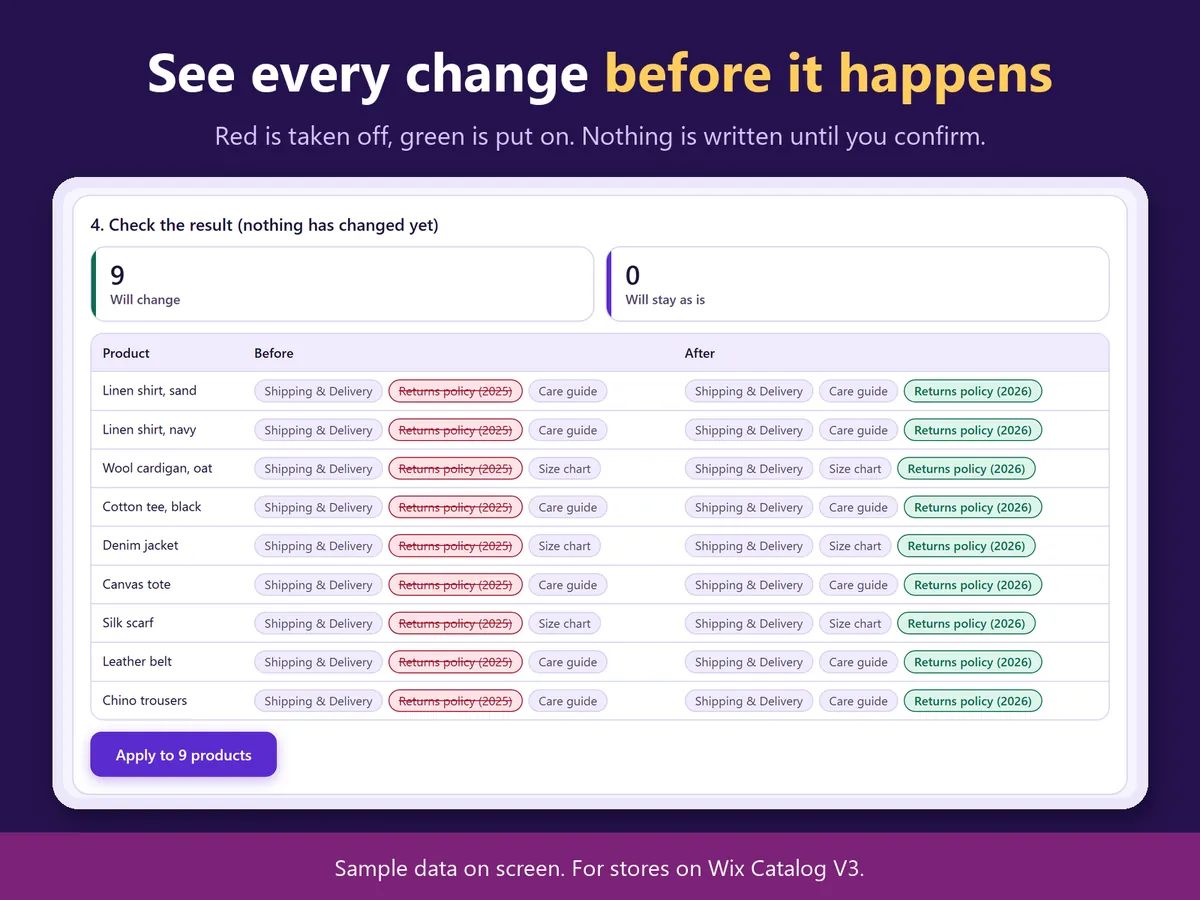
Removing or swapping an info section means editing products one at a time. Remove an info section from many products, or replace it with another, in one run. A preview shows what comes off and goes on, and undo puts back only what the run changed. Works with the current Wix product catalog (Catalog V3).
Info Section Bulk Manager: details and FAQ 情報セクション一括管理: 画面・特徴・よくある質問(日本語) On the Wix App Market — free plan available -
Bulk Tracking Import
Have a carrier CSV full of tracking numbers and Wix wants them one order at a time? Load the file, check the matches by order number, do a dry run, then mark the matching orders as fulfilled with their tracking. Names, addresses and emails are not used or stored.
Guide: add tracking numbers in bulk 解説: 追跡番号をまとめて入れる方法(日本語) On the Wix App Market — free plan available -
Japan Shipping Label CSV
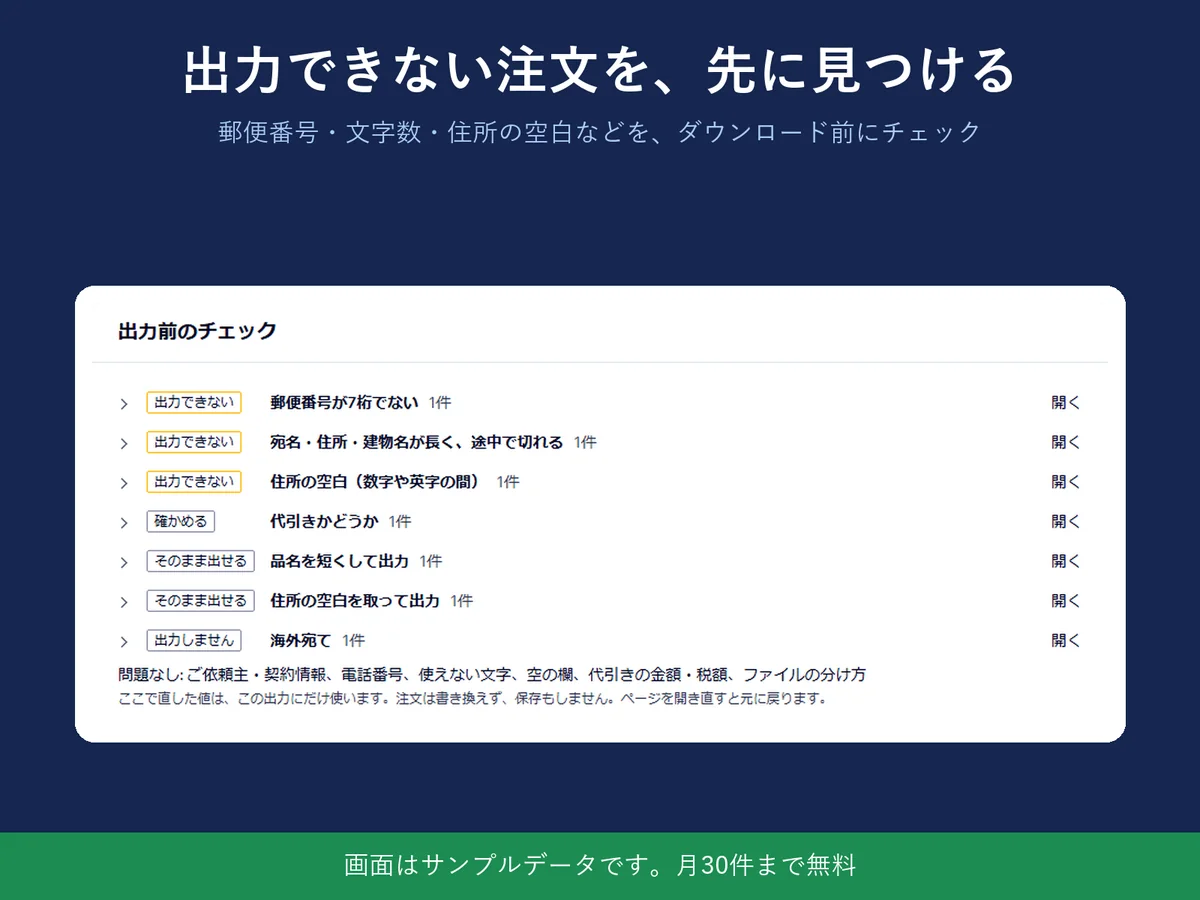
Still retyping order addresses into a carrier's system? Japan Shipping Label CSV turns your unfulfilled store orders into CSV files in the import layouts of Yamato B2 Cloud, Japan Post Click Post and Sagawa e-Hiden III, and warns about bad postal codes and over-long names before you download. Recipient data stays in your browser.
Japan Shipping Label CSV: details, video and FAQ 送り状CSV: 画面・特徴・よくある質問(日本語) On the Wix App Market — free plan available -
Sales Journal CSV
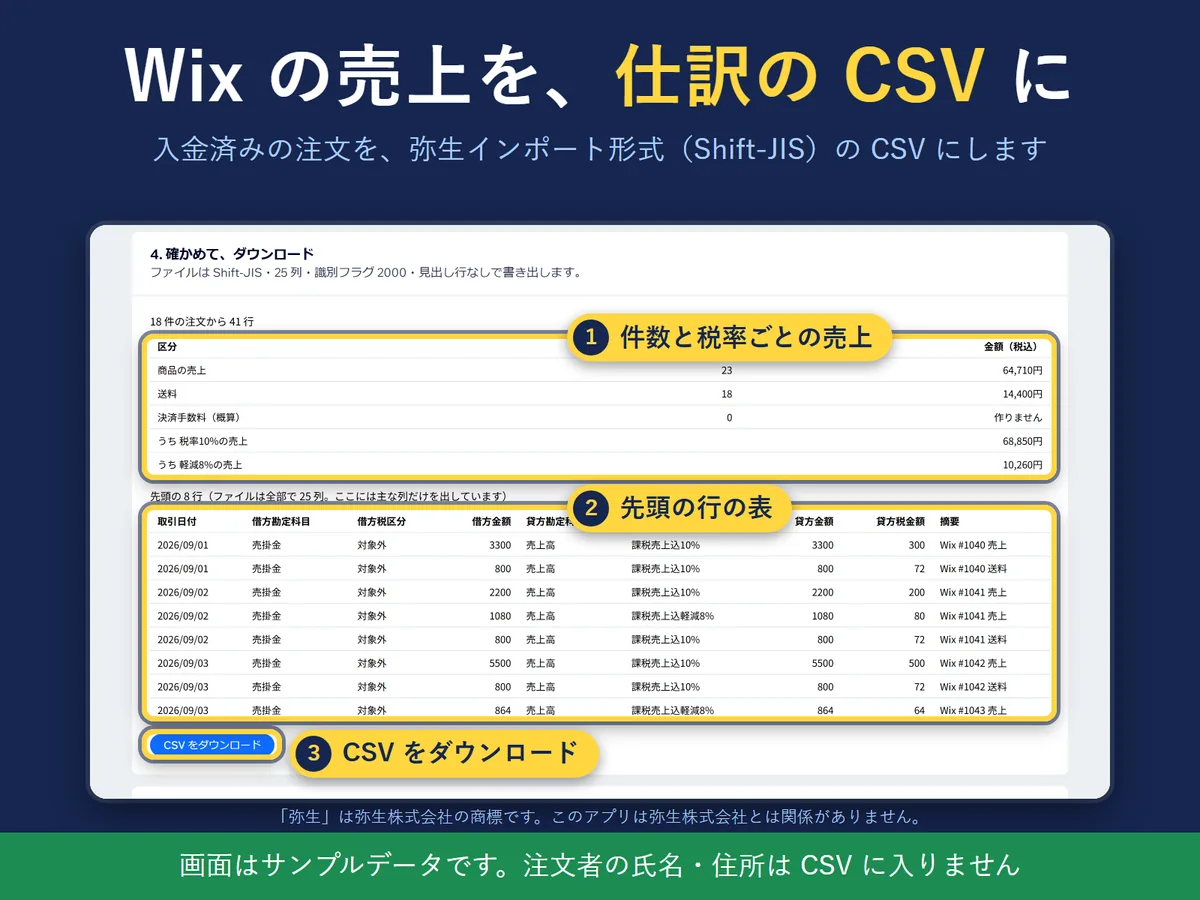
Typing a month of sales into accounting software by hand is slow. Turns paid Wix orders into a CSV in Yayoi import format or freee transaction import format, with rows split by 10% and reduced 8% tax. Customer names and addresses do not go into the CSV. Japanese screen only, for shops in Japan.
Sales Journal CSV: details and FAQ 売上仕訳CSV: 画面・特徴・よくある質問(日本語) 解説: Wix の売上を freee 会計に取り込む方法(日本語) On the Wix App Market — free plan available -
Business Day Calendar
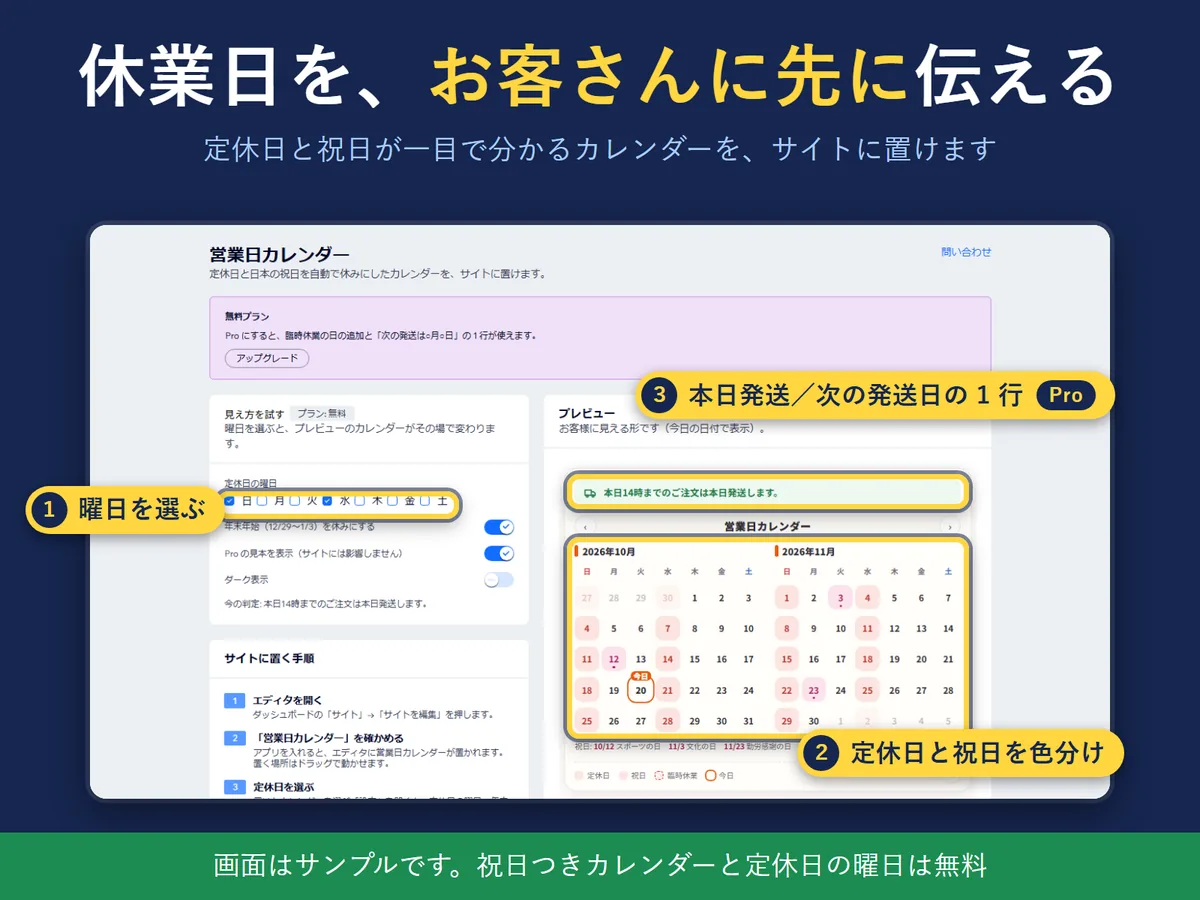
Wix has no holiday mode, so closing days get announced by hand each time. Put a calendar on your site that marks your weekly closing days and Japanese public holidays, and, on the Pro plan, a line for the next shipping day. Screens in Japanese and English, for shops in Japan.
Business Day Calendar: details and FAQ 営業日カレンダー: 画面・特徴・よくある質問(日本語) On the Wix App Market — free plan available
For Windows
Work faster with screenshots and Excel files, offline. Nine apps on the Microsoft Store.
-
Markshot for Windows
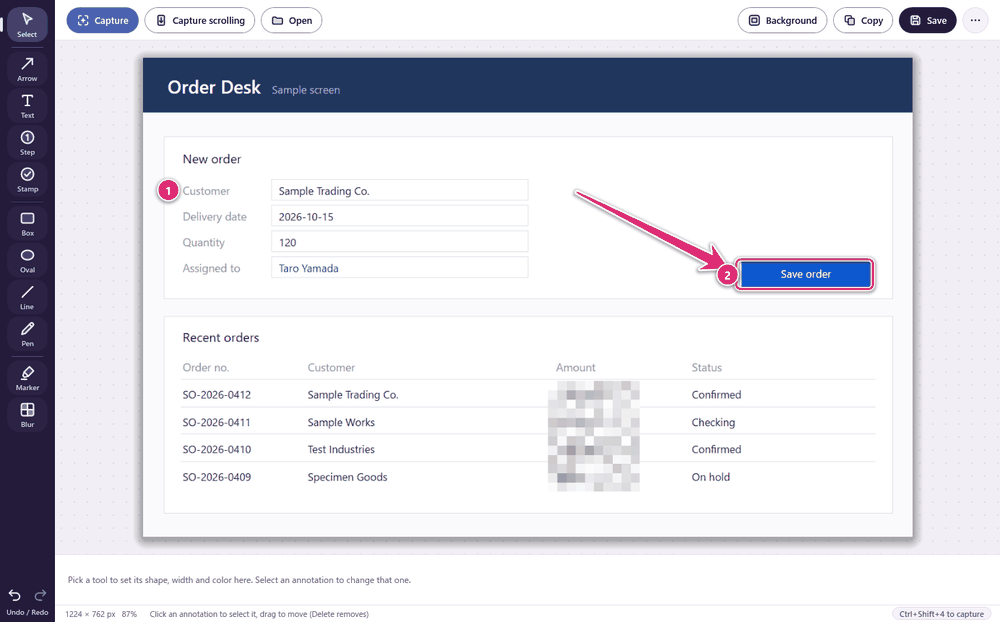
Sometimes one image with an arrow and a number says more than three paragraphs. Press Ctrl+Shift+4, drag over the screen, add arrows, boxes, text and step numbers, blur what you can't show, and save as PNG. Free, and nothing is uploaded.
Details, screenshots and FAQ 日本語のページ Free on the Microsoft Store

-
Table Flattener by Hullspark
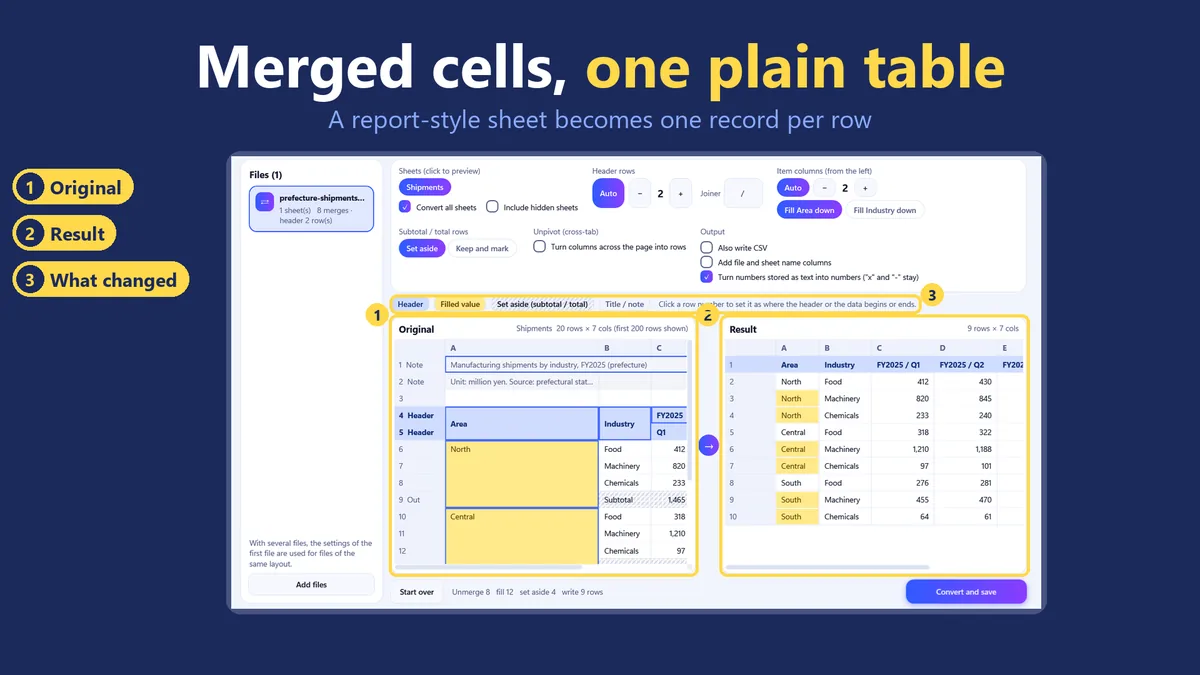
Reports full of merged cells and two-row headers are hard to sort or load anywhere. Drop in an Excel file: the app estimates the table's layout, shows the original and the result side by side, and saves a new file with one record per row. Your original is not changed. The estimate can be wrong, so check the preview before you save.
Guide: flattening merged cells and multi-row headers Guide: unmerging cells in many sheets and many files On the Microsoft Store
-
Document Image Extractor by Hullspark

Copying pictures out of Excel and Word files one by one loses quality. Drop in .xlsx, .docx or .pptx files and the app writes the pictures out as the original data. The free edition does 20 pictures from one file; names with the sheet and cell or slide number are in the full edition.
Details and FAQ 文書の画像まとめ取り出し(日本語) Free on the Microsoft Store
-
Path and Filename Checker by Hullspark

A copy that stops without saying which file is hard to chase down by hand. Choose a folder before you move or back it up, and the app lists the paths that are too long and the names that cannot be used. The free edition shows the first 50 rows; entering the destination is in the full edition.
Details and FAQ パス・ファイル名チェッカー(日本語) Free on the Microsoft Store
-
Sheet Compare
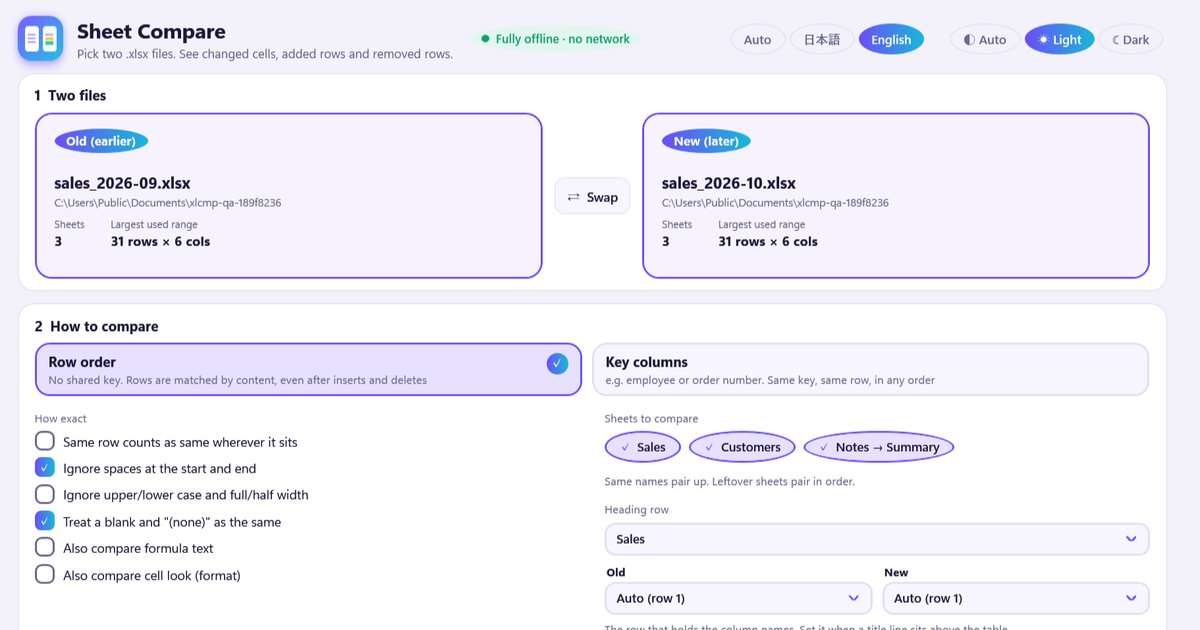
Finding what changed between last month's workbook and this month's by eye is slow. Pick two .xlsx files and the app lists the changed cells, added rows, removed rows and column changes, with a side-by-side view and an export to .xlsx. Works offline; your files are only read.
Details, screenshots and FAQ 表の比較(日本語) On the Microsoft Store
-
Spreadsheet Splitter
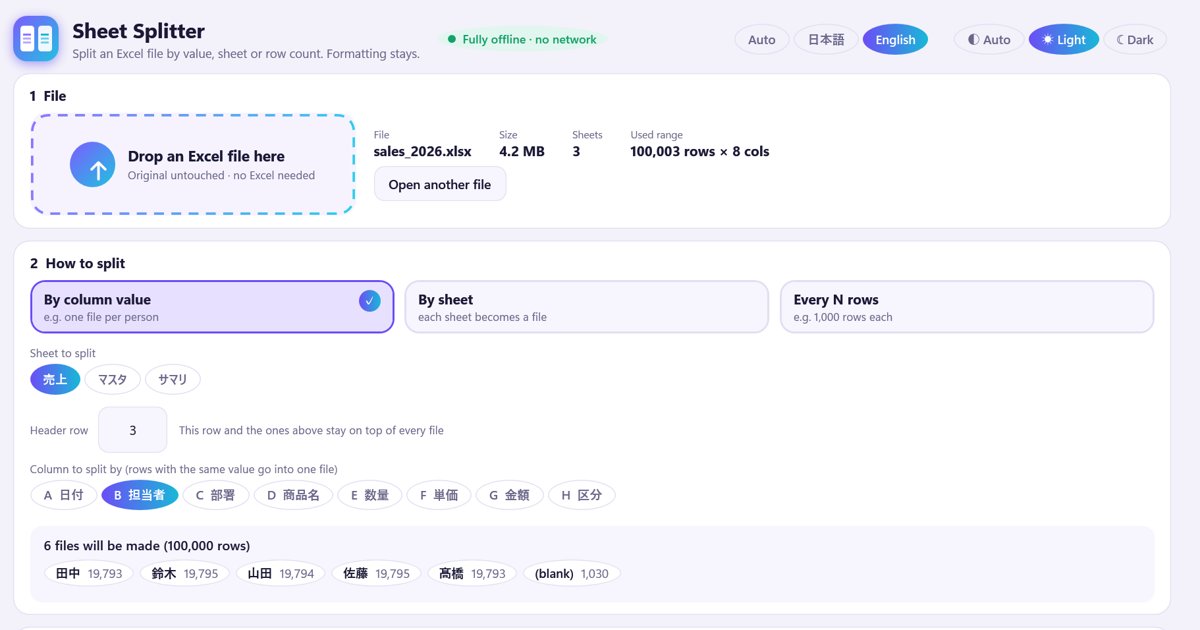
Handing each person or branch their own rows by copy, paste and delete takes half a day. Open an .xlsx, pick a column and press Split: one file per value, by sheet, or every N rows. Formatting stays, each file holds only its own rows, and a list shows what to check before you hand them out. Works offline.
Details, screenshots and FAQ 表の分割(日本語) On the Microsoft Store
-
Comment & Change List for .docx

Comments from several reviewers end up scattered across copies of the same file. Puts the comments, replies and tracked changes of .docx files in one table, with filters, CSV and copy. Word does not need to be installed.
Details and FAQ コメント・変更履歴 一覧(日本語) Free on the Microsoft Store
-
Workbook Link Finder
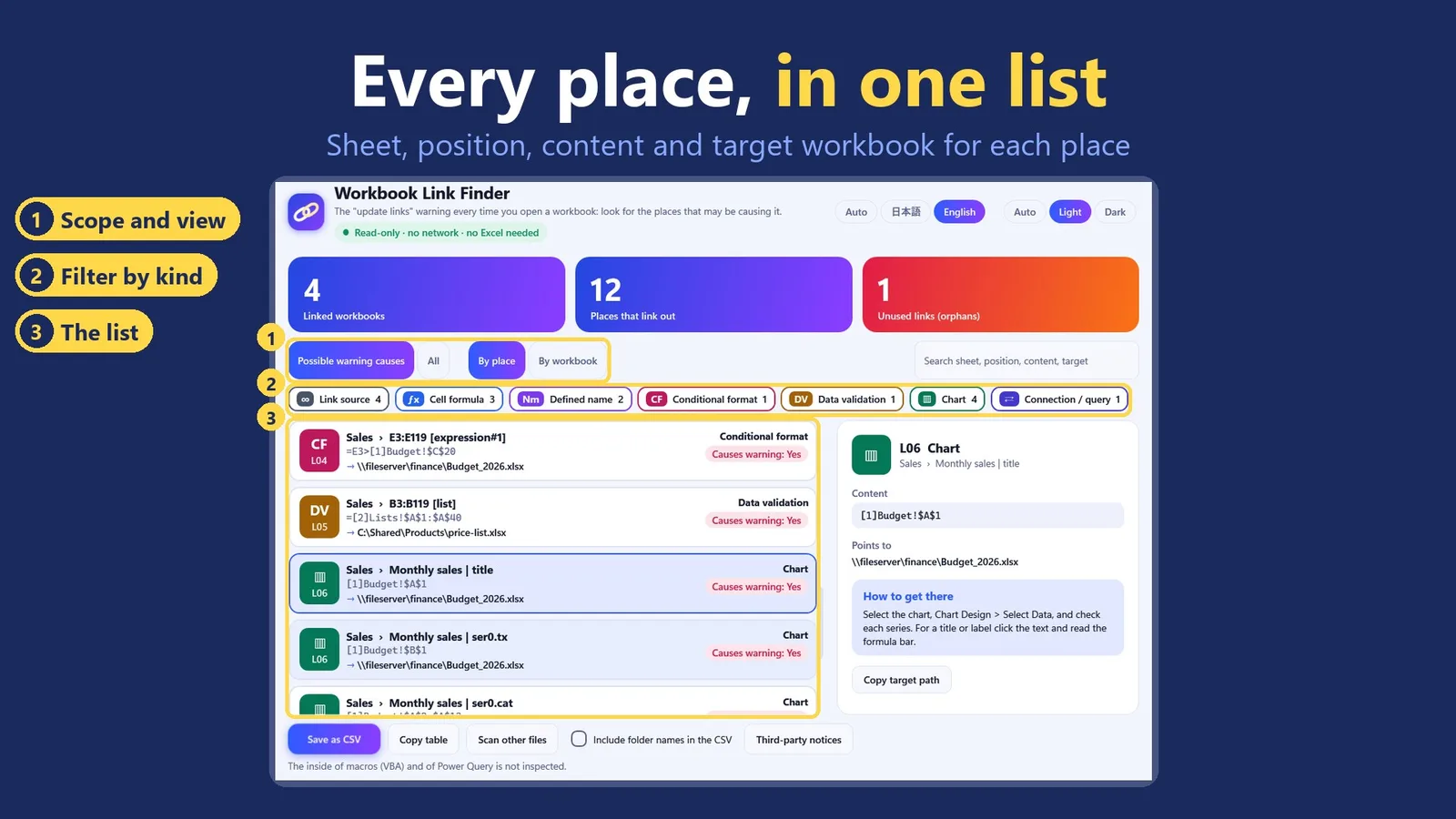
Excel asks whether to update links, but Edit Links only names the files. Drop in Excel files or a folder and the app lists the places that point to another workbook, with the sheet, position, content and target. It only reads your files and works without Excel. It can miss some kinds of reference, so the list shows what it found.
Details, screenshots and FAQ 日本語のページ On the Microsoft Store
-
Reduce xlsx File Size by Hullspark
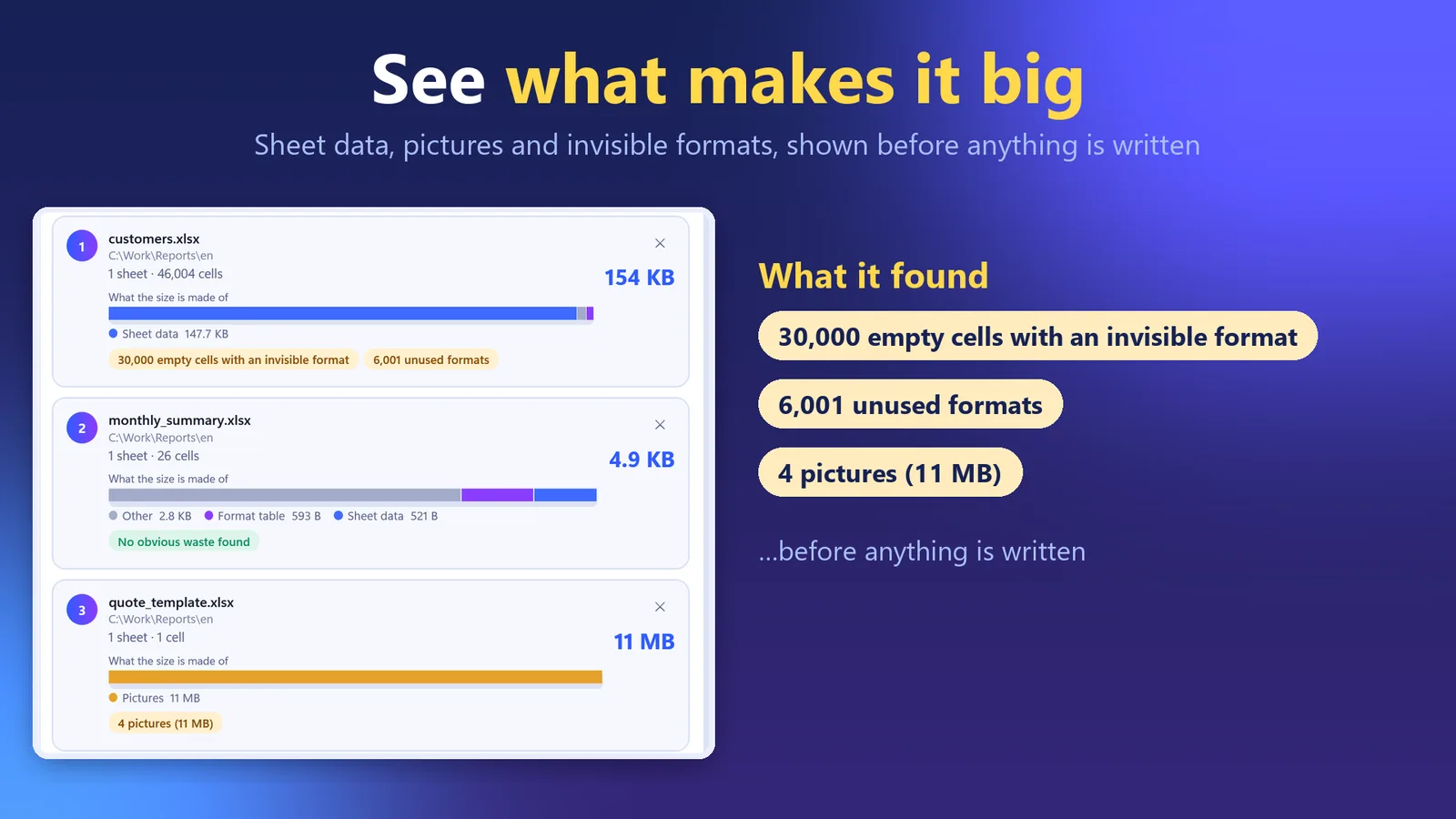
A workbook that was 200 KB last year is 40 MB now. Drop in .xlsx files or a folder: the app shows what each file's size is made of, writes a smaller copy named name_small.xlsx and checks it. Your original is never changed. The free edition handles 3 files per run.
Details, screenshots and FAQ 日本語のページ Free on the Microsoft Store
On the web
Search is free; daily alerts are a paid subscription. The site is in Japanese.
-
Japanese public tenders
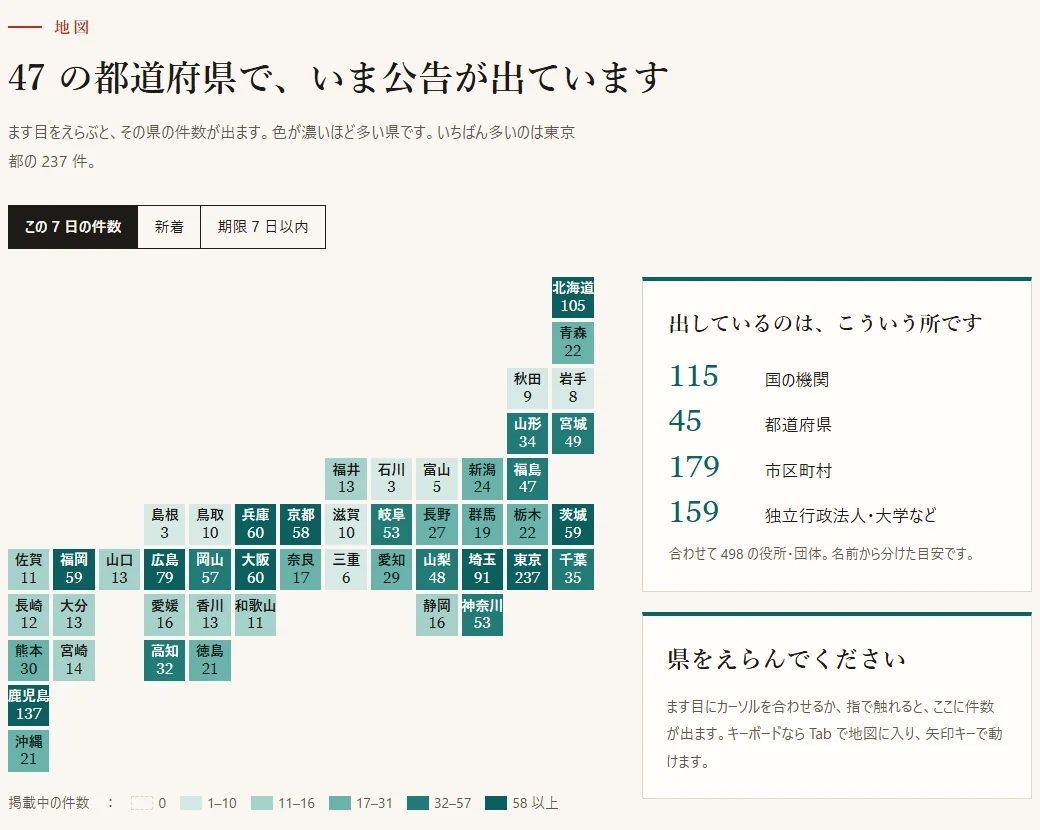
Public tenders in Japan are spread over many agency sites. This site lists Japanese public tenders in one place and is updated daily.
入札公告アラート: 使い方と質問(日本語) Open the tender alert site
For Minecraft
Small free Fabric mods on CurseForge, one feature each.
-
Death Point Marker

Forgot where you died? After you respawn, one line shows the direction, distance and coordinates back to your items. The other mods are Death Log, Coordinate HUD, Chest Search, Item Pickup Filter and Sound Subtitle Colors.
Free on CurseForge
Help and policies
- Support — how to get in touch, what to include, and short FAQs for the Atlassian apps, Markshot and the Wix apps (the Wix FAQs are in Japanese).
- Privacy policy — what each app reads, what it stores, and where it goes. The Wix apps have their own page.
- Terms — the Atlassian apps use Atlassian's standard end-user agreement.
Who makes these
Hullspark is a one-person studio making small apps for Atlassian, Wix and Windows. I design, decide and verify; much of the code is written with AI.